6. How to use the models?
We used a mitigation model built with OSeMOSYS to quantify the costs and benefits of implementing LTS mitigation actions across different scenarios and futures. For adaptation, we developed a separate model using an open-access cost-benefit analysis tool to evaluate the economic impacts of sector-specific adaptation strategies aligned with the LTS, also incorporating uncertainty analysis through RDM.
6.1. Mitigation Model
First, it is important to consider the workflow shown in Figure 1. This workflow indicates which files are important for executing each step and provides a better general understanding.
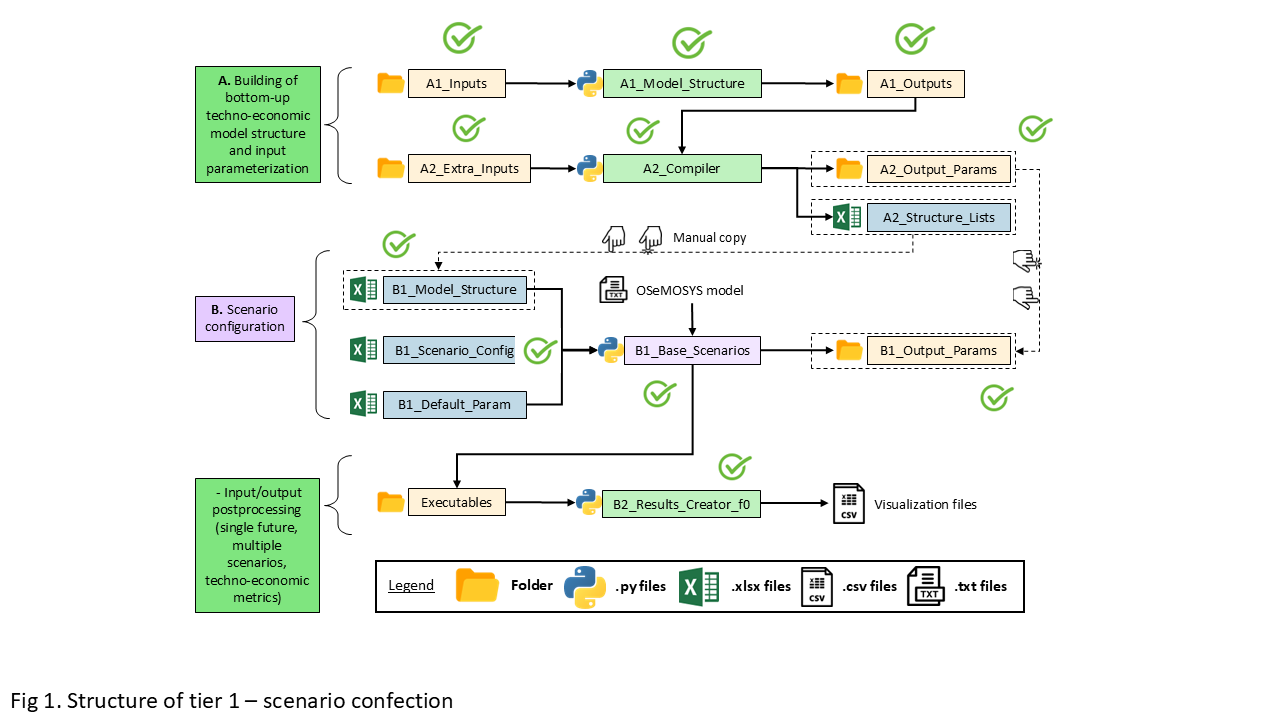
Figure 19: Workflow of the OSeMOSYS-ECU model
Create the model structure (A1)
The first step of OSeMOSYS-ECU is to create the model structure. To do this, you need to run the Python script A1_Model_Structure. To run this script, it is necessary to parameterize the Excel files inside A1_Inputs:
A-I_Classifier_Modes_DemandA-I_Classifier_Modes_SupplyA-I_Classifier_Modes_TransportA-I_Horizon_Configuration
Then, you must run the Python script A1_Model_Structure. After the execution is complete, some files will be generated inside A1_Outputs:
A-O_AR_Model_Base_Year.xlsxA-O_AR_Projections.xlsxA-O_Demand.xlsxA-O_Fleet.xlsxA-O_Parametrization.xlsxA-O_Fleet_Groups.pickle
These files are overwritten with the default structure each time the Python script is run, so it is recommended to run this script only once.
Model compiler (A2)
The second step consists of defining the process to compile the model into parameter files. To do this, it takes as inputs the Excel files from A1_Outputs, as well as the Excel files from the A2_Xtra_Inputs folder and the file A2_Structure_Lists. Then, run this Python script.
It is important to have in the folder A2_Outputs_Params/Default, the default files by parameter used by the Python script A2_Compiler. This script generates some files in the A1_Outputs and A2_Outputs_Params folders. In the second folder, the same number of subfolders as there are scenarios in the model is generated, and inside these subfolders, Excel files with data by parameter are found.
Create the input file (B1)
The next step is longer and requires care. It is important to follow the workflow in the figure at the beginning of the section. First, go to the folder B1_Output_Params and delete any subfolder you find there. Then, go to the folder A2_Outputs_Params, copy the folders with the names of the scenarios, and paste them into B1_Output_Params. It is also necessary to manually copy the data from the file A2_Structure_Lists.xlsx to the file B1_Model_Structure.
Next, you must parameterize the model in the files B1_Scenario_Config.xlsx.
To write the model, use the script B1_Base_Scenarios_Adj_Parallel.py.
The results of this execution are found in the folder B1_Output_Params. The files in this folder overwrite those from the A2 step outputs. Additionally, the model file is located in the Executables folder, inside a subfolder for each scenario. This file is a text file, for example:
BAU_0.txt
Model execution (B1)
To run the model, use the script B1_Base_Scenarios_Adj_Parallel.py.
The results of this execution are found in the Executables folder, inside a subfolder for each scenario, and generate three files.
Results concatenation (B2)
This step facilitates the analysis of results. When running the Python script B2_Results_Creator_f0.py, it takes the CSV files with input and output data of the model for each scenario, concatenates them, and creates four files:
Scenario_Name_Input.csvScenario_Name_Input_2024_10_22.csvScenario_Name_Output.csvScenario_Name_Output_2024_10_22.csv
The files with dates allow tracking of executions made on different dates, as the files without dates are overwritten with each execution.
6.2. Adaptation Model
Overview
The Metodología para la Priorización de Medidas de Adaptación frente al Cambio Climático is a structured approach developed by GIZ to support decision-makers in evaluating and ranking adaptation measures. It is based on multi-criteria analysis (MCA) and participatory processes, ensuring that prioritized actions are effective, feasible, and aligned with local needs.
Steps for Using the Methodology
Define the Context - Determine the geographical scope (national, regional, or local). - Identify the climate risks (e.g., droughts, floods) and sectors (e.g., agriculture, water resources).
Identify Adaptation Measures - Collect a list of potential adaptation actions from existing plans, expert input, or community consultations. - Include structural (infrastructure) and non-structural (policies, education) measures.
Establish Evaluation Criteria - Common criteria include: - Effectiveness: How well does the measure reduce climate risk? - Feasibility: Technical, social, and institutional capacity for implementation. - Cost: Initial investment and operational costs. - Co-benefits: Additional environmental, social, or economic benefits. - Urgency & Equity: How urgent is the measure, and who benefits?
Engage Stakeholders - Conduct workshops with stakeholders (government, civil society, technical experts). - Define and weight evaluation criteria based on local priorities.
Score and Rank Measures - Evaluate each adaptation measure against the selected criteria. - Apply weights to reflect the importance of each criterion. - Use scoring matrices (e.g., Excel-based tools) to calculate final scores.
Interpret Results - Generate a ranked list of prioritized measures. - Use this list to guide adaptation